Abilis CPX 2000, update 9.1.0
Released on February 9, 2026.
Enhancements
- WEB
-
-
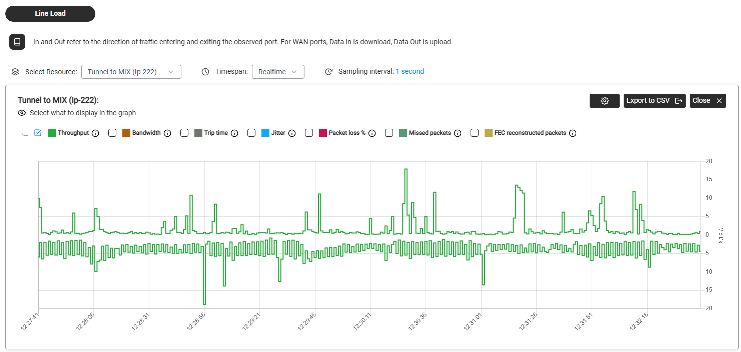
Improved Networking traffic monitoring, graphs and data flow control.
Figure: Network web page
-
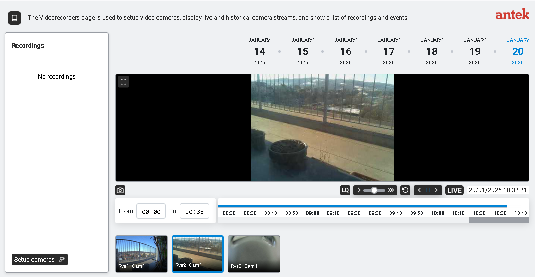
Renewed and enhanced Videorecorder web pages for a more effective user experience.
Figure: Videorecorder web page
-
New PC-PHONE service, based on WebSocket Secure technology (WSS).
Figure: Pcphone keypad
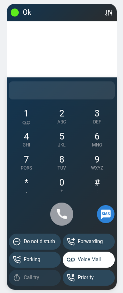
WebSocket is a real-time bidirectional communication protocol designed for efficient and secure data exchange between a client (web browser, application) and a server.
WebSocket Secure connections piggyback on the SSL/TLS handshake used by HTTPS, encrypting the data stream, preventing man-in-the-middle attacks and eavesdropping.
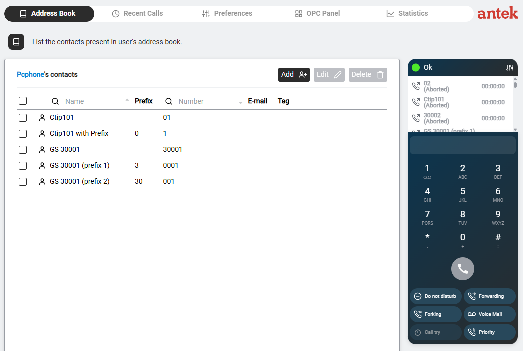
Users configured for this service can use it directly from the "Address Book" or "Recent Calls" or "OPC Panel" pages of the Phone section, simply by enabling the microphone in the browser.
Supported browsers are Chrome/Opera/Edge.
Figure: Pcphone keypad
Configuration sample for user:
[14:20:44] ABILIS-CPX:d user ctip

--------+--------------------------------+--------------------------------+----
CTIP:   |USER:                           |NUM:                            |ACT:
        |                                |ADDRBOOK-NUM:                   |
--------+--------------------------------+--------------------------------+----
165      wpots                            769                              YES
                                          NUM
Configuration sample for WPOTS port:
[15:36:19] ABILIS-CPX:d p ctip:165

CTIP:165 DESCR:wpots
Act     card:WPOTS-5<1>                 USER:wpots
Run     OPSTATE:UP        LOG:NO                               TYPE:USER
        signalling:WPOTS                HOLD:YES     CT:ICT    SS:YES
        NUM:(769)                       ADDRBOOK-NUM:NUM
        IP-PERMIT:SYS
Diagnostic sample of WPOTS port:
[15:36:21] ABILIS-CPX:d d ctip:165

CTIP:165 ----------------------------------------------------------------------
       wpots
       USER:wpots                             OPSTATE:UP          STATE:UP
       ------------------------------------------------------------------------
       CH: STATE: [Q932-STATE:] CG: [SG:]               CD: [SD:]
       ------------------------------------------------------------------------
                         *** All channels disconnected ***
       ------------------------------------------------------------------------
       WPOTS-STATE:ON-LINE             TONE:NONE
       TRACE:
       CODER:G.711A   SP:64000
                      Local:192.168.020.254-28282  Remote:192.168.020.100-55896
As already described, WSS technology is very secure, thanks to the encrypted SSL connection. Moreover unauthorized access to the service is monitored and, if necessary, blocked by the IP banning system, via the new entry 'CtiSys':
[14:20:44] ABILIS-CPX:d ipban

...

---------+------------+-----------+------------+-----------+-------------------
RES:     | ACTION:    | MAX-FAIL: | FIND-TIME: | BAN-TIME: | WHITE-LIST:
---------+------------+-----------+------------+-----------+-------------------
...
CtiSys   | DFT        | DFT       | DFT        | DFT       | DFT
---------+------------+-----------+------------+-----------+-------------------
-
- ETH5G
-
-
Added support for ZTE LTE 5G modems, connected to Abilis via ETH/ETHUSB interface.
Configuration sample:
[11:49:17] ABILIS-CPX:d p res:eth5g-1

RES:Eth5G-1 -------------------------------------------------------------------
Run    DESCR:Eth5G-1
       LOWRES:Eth-1       MAC:AUTO
       USERNAME:MyUser                            PASSWORD:********
       PDN-APN:iliad
RES:Eth-1 ---------------------------------------------------------------------
Run    DESCR:Eth-1
       LOG:DS          ALERT:NO        MODE:AUTO                 max-vlans:3
       MAC-ADDR:FACTORY (20-2E-15-00-04-AC)
       ip-rxbuf:25     arp-rxbuf:5     pppoed-rxbuf:5         pppoes-rxbuf:25
Parameters:
[11:49:20] ABILIS-CPX:d p res:eth5g-1 ?

Eth5G resource parameters:

DESCR:     Resource description.
           Max 79 chars. Case sensitive.
           Spaces require double quotes (E.g. "str1 str2").
           Using <empty> string, the description is set to its default value,
           i.e. "type-nnn", where 'type' is the resource type and 'nnn' is
           the resource index.
LOWRES:    Lower Ethernet resource [NONE, Eth-xxx, EthUsb-xxx]
MAC:       MAC address [AUTO, XX-XX-XX-XX-XX-XX]
           Broadcast and multicast addresses are not allowed.
USERNAME:  Login usename. Max 32 ASCII characters.
           Spaces require double quotes (E.g. "str1 str2").
PASSWORD:  Login password. Max 32 ASCII characters.
           Spaces require double quotes (E.g. "my key").
PDN-APN:   String corresponding to the Access Point Name.
           "DFT" or max 64 ASCII characters.
           "DFT" means to keep modem default APN.
           Spaces require double quotes (E.g. "aaa bbb").
Diagnostics sample:
[15:22:54] ABILIS-CPX:d d eth5g-1

RES:Eth5G-1 -------------------------------------------------------------------
       Eth5G-1
       STATE:READY
       LOWRES:Eth-1      MAC:10-3C-59-0B-35-96   ModSt:UP     LineSt:UP
       CUR-USERNAME:MyUser                                CUR-PASSWORD:********
       ModStDetail:modem_init_complete           LineStDetail:ppp_connected
       Manufacturer:ZTE  FW-VER:IRL_H3G_MC7010DV1.0.0B01      BOARD:MC7010-1
       ------------------------------------------------------------------------
       VOICE-STATE:DOWN        PDN-STATE:READY         SMS-STATE:READY
       ------------------------------------------------------------------------
       NET:Iliad               NET-MODE:LTE
       RSRP-dBm:-110           RSRQ-dB:-12             SINR-dB:6.8
       IMEI:864155042699386    IMSI:222500018154128    SIM:393513619849
       CELL-FEAT:DATA,SMS
       ------------------------------------------------------------------------
-
- ETHWIFI
-
-
Added support for MikroTik WIFI modems, connected to Abilis via ETH/ETHUSB interface, configurable both as a WiFi client or as a WiFi access point.
Configuration sample:
[09:46:57] ABILIS-CPX:d p res:ethwifi-1

RES:EthWifi-1 -----------------------------------------------------------------
Run    DESCR:EthWifi-1
       LOWRES:EthUsb-1    MAC:AUTO                            MODE:CLI-ROUTER
       SSID:MyWifi                            PWD:********
RES:EthUsb-1 ------------------------------------------------------------------
Run    DESCR:EthUsb-1
       LOG:DS          ALERT:NO        MODE:AUTO                 max-vlans:2
       MAC-ADDR:FACTORY (F8-E4-3B-7D-74-A6)
       ip-rxbuf:25     arp-rxbuf:5     pppoed-rxbuf:5         pppoes-rxbuf:25
Parameters:
[09:47:31] ABILIS-CPX:d p res:ethwifi-1 ?

EthWifi resource parameters:

DESCR:     Resource description.
           Max 79 chars. Case sensitive.
           Spaces require double quotes (E.g. "str1 str2").
           Using <empty> string, the description is set to its default value,
           i.e. "type-nnn", where 'type' is the resource type and 'nnn' is
           the resource index.
LOWRES:    Lower Ethernet resource [NONE, Eth-xxx, EthUsb-xxx]
MAC:       MAC address [AUTO, XX-XX-XX-XX-XX-XX]
           Broadcast and multicast addresses are not allowed.
MODE:      Wifi interface configuration [CLI-ROUTER, CLI-BRIDGE, AP-BRIDGE]
SSID:      Wifi access point's SSID. Max 32 ASCII characters.
           Spaces require double quotes (E.g. "str1 str2").
PWD:       Wifi access point's Password. Max 64 ASCII characters.
           Spaces require double quotes (E.g. "my key").
Diagnostics sample:
[15:22:54] ABILIS-CPX:d d ethwifi-1

RES:EthWifi-1 -----------------------------------------------------------------
       EthWifi-1
       STATE:READY
       LOWRES:EthUsb-1   MAC:F4-1E-57-71-0F-36   ModSt:UP     LineSt:UP
       CUR-MODE:CLI-ROUTER
       CUR-SSID:MyWifi                                        CUR-PWD:********
       LineStDetail:connected-to-ess
       Manufacturer:MikroTik        FW-VER:6.49.17         BOARD:mAP lite
       ------------------------------------------------------------------------
       MODE:CLI-ROUTER
       SSID:MyWifi                            BSSID:00:14:5C:94:E8:96
       CHANNEL:2472/20-eC/gn(18dBm)           PROTOCOL:802.11
       TX-RATE:81Mbps-40MHz/1S                RX-RATE:108Mbps-40MHz/2S
       SIGNAL-dBm:-68       NF-dBm:-110       SNR-dB:42
       TX-CCQ:74%                             P-THROUGHPUT:15226
       ------------------------------------------------------------------------
-
- MIO devices
-
-
MODBUS is a widely used, simple, and open communication protocol for industrial devices, (PLCs, sensors and other controllers).
It uses serial communication lines, Ethernet, or the Internet protocol suite as a transport layer.
It operates on a client-server (master-slave) model, where a client requests data from one or more servers, which respond with the requested information, making it a standard for connecting diverse devices and different vendors' equipment.
Here it is a schematic representation of how MODBUS devices (MIO) can be managed in Abilis:
Figure: MODBUS in Abilis
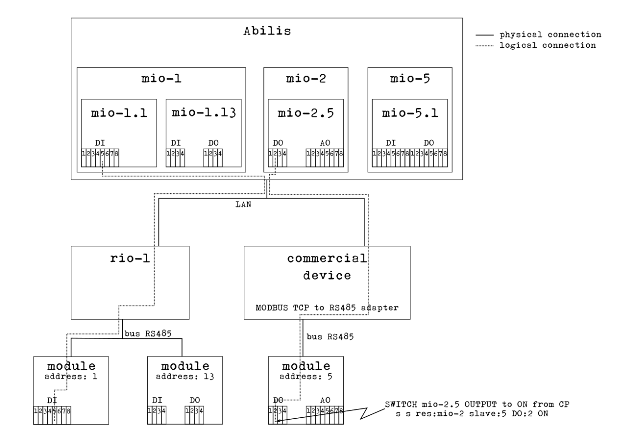
Once connected, MODBUS devices can be discovered, bound, configure and controlled by Abilis as any of the other I/O device.
The number of MIO resources that can be activated is limited by the value configured in IO resource and the new resource activation depends on license setting:
[11:26:49] ABILIS-CPX:d p res:io

RES:Io ------------------------------------------------------------------------
Run    DESCR:Io_devices_entry_point
       LOG:DS        ACT:YES     TOS:0-N                      tcp-rwin:16384
       max-rio:4     max-wio:1   max-mio:4   max-knx:1        tcp-swin:16384
       wdir:C:\APP\IO\

[11:26:54] ABILIS-CPX:d p res:io ? max-mio

Io resource parameters:

max-mio:   Maximum number of Mio devices [1..15]

[11:27:04] ABILIS-CPX:LICENCE DISPLAY PERMISSIONS

ACTIVE PERMISSIONS:

-------------|-----------|-----------------------------------------------------
Name         |Value      |Description
-------------|-----------|-----------------------------------------------------
ABILISID     |1801237    |Abilis CPX serial number
EXPIRY       |NONE       |Licence expiration date YYYYMMDD
MAXVER       |9          |Licence is valid up this Abilis major version
-------------|-----------|-----------------------------------------------------
...
MIO          |4          |Number of MIO resources [0, 1..15]
Configured MIO resources are visible in D DEV command layout:
[10:08:20] ABILIS-CPX:d dev
...
------------- Active Rio/Wio/Mio/Knx/Rvs Resources and Devices: ---------------
Res         Bound  Descr                  St MAC                IpAddr/LowRes
-------------------------------------------------------------------------------
...
Mio-1       Yes    Mio-1                  UP 04-EE-E8-16-84-8A  192.168.000.200
Mio-2       Yes    Mio-2                  UP 04-EE-E8-1C-EB-0E  192.168.000.201
Configured MIO resources and nodes are visible in D TREE command output:
[10:06:27] ABILIS-CPX:d tree

...
----------------------------- System Resource(s) ------------------------------
...
Io
  \---Rio-1
  \---Rio-2
  \---Mio-1
      \---Mio-1.1
  \---Mio-2
      \---Mio-2.13
  \---Tcp
...
Configuration sample:
[17:06:53] ABILIS-CPX:d p res:mio-1

RES:Mio-1 ---------------------------------------------------------------------
Run    DESCR:Mio-1
       LOG:DS          ACT:YES         GW-RES:NONE    TCP-REMPORT:4196
       - IpConf parameters (Read Only) -----------------------------------------
       MAC:04-EE-E8-16-84-8A   IPRES:Ip-1
       IPADD:192.168.000.200   MASK:255.255.255.000   GW:192.168.000.232
       -------------------------------------------------------------------------
       SLAVE  | DESCR:          ADDR: HW-TYPE:
       -------+-----------------------------------------------------------------
         AI:  | UNIT:    MIN:    MAX:    ALM-LO: ALM-HI: HYST:   SENSIT: POLL:
              |          DFT:            ALERT-ALM-LO:   ALERT-ALM-HI:
              |          DESCR:                                     REGADDR:
              |          ADJUST-P0:      ADJUST-P1:
       1      | Inverter_1      1     CHINT-DTSU666.014 (7)
             1| V        -999.0  999.0   -       -       5.0     1.0     1.0
              |          0.0             NO              NO
              |          Ua Voltage                                 48199
              |          -               -
             2| V        -999.0  999.0   -       -       5.0     1.0     1.0
              |          0.0             NO              NO
              |          Ub Voltage                                 48201
              |          -               -
             3| V        -999.0  999.0   -       -       5.0     1.0     1.0
              |          0.0             NO              NO
              |          Uc Voltage                                 48203
              |          -               -
             4| A        -99.00  99.00   -       -       5.00    0.10    1.0
              |          0.00            NO              NO
              |          Ia Current                                 48205
              |          -               -
             5| A        -99.00  99.00   -       -       5.00    0.10    1.0
              |          0.00            NO              NO
              |          Ib Current                                 48207
              |          -               -
             6| A        -99.00  99.00   -       -       5.00    0.10    1.0
              |          0.00            NO              NO
              |          Ic Current                                 48209
              |          -               -
             7| W        -9999   9999    -       -       5       200     1.0
              |          0               NO              NO
              |          Pt Act Power                               48211
              |          -               -
             8| W        -9999   9999    -       -       5       200     1.0
              |          0               NO              NO
              |          Pa Act Power                               48213
              |          -               -
             9| W        -9999   9999    -       -       5       200     1.0
              |          0               NO              NO
              |          Pb Act Power                               48215
              |          -               -
            10| W        -9999   9999    -       -       5       200     1.0
              |          0               NO              NO
              |          Pc Act Power                               48217
              |          -               -
            11| Hz       45.00   55.00   -       -       5.00    0.50    1.0
              |          45.00           NO              NO
              |          Frequency                                  48261
              |          -               -
            12| W        -9999   9999    -       -       5       10      1.0
              |          0               NO              NO
              |          Power Demand                               48273
              |          -               -
            13| Var      -9999   9999    -       -       5       10      1.0
              |          0               NO              NO
              |          Pt React Power                             48219
              |          -               -
            14|          -2.000  2.000   -       -       5.000   0.100   1.0
              |          0.000           NO              NO
              |          PFt Pwr Factor                             48235
              |          -               -
       -------+----------------------------------------------------------------
Diagnostic sample:
[15:41:08] ABILIS-CPX:d d res:mio-1

RES:Mio-1 ---------------------------------------------------------------------
       Mio-1
       STATE:UP
       MAC:04-EE-E8-16-84-8A
       IPRES:Ip-1
       RemAdd-RemPort:192.168.000.200-4196
       HW-DESCR:
       HW-ID:
       Lines summary:  DI:0  DO:0  AI:16  AO:0
   ----------------------------------------------------------------------------
   SLAVE:1    STATE:UP   HW-TYPE:CHINT-DTSU666.014 (7)
              DI:0   DO:0   AI:16  AO:0
   ANALOG INPUT
   AI:1  234.4 V           Ua Voltage
   AI:2  235.6 V           Ub Voltage
   AI:3  233.6 V           Uc Voltage
   AI:4  0.74 A            Ia Current
   AI:5  0.74 A            Ib Current
   AI:6  0.93 A            Ic Current
   AI:7  306 W             Pt Act Power
   AI:8  147 W             Pa Act Power
   AI:9  148 W             Pb Act Power
   AI:10 -131 W            Pc Act Power
   AI:11 50.02 Hz          Frequency
   AI:12 0 W               Power Demand
   AI:13 -133 Var          Pt React Power
   AI:14 0.671             PFt Pwr Factor
   AI:15 .
   AI:16 .
Refer to Abilis Totorial for further information.
-
Examples of MODBUS devices include HMI hardware, I/O interfaces and modules, sensors, modems, device controllers, PLCs, network gateways, network host adapters, AC/DC inverters, RTUs, SCADA hardware, software device drivers, smart home devices, routers, etc.
Each device has hardware features and a set of specific information that depends on the manufacturer.
In order for a device to be used by Abilis, its characteristics must be known by Abilis.
For this purpose, Abilis maintains a device database, that contains profiles for a set of known devices, collecting factory information provided by the manufacturer.
Each profile is known within the system by a number and a name that uniquely identifies it, called 'HW-TYPE'.
The device database is stored on disk (in C:\APP\IO\MIO\ directory); it is part of the Abilis firmware and it is updated when the Abilis firmware is updated.
The database can be consulted from the command line by means of "HELP MODBUS DEVICES" commands
[16:02:46] ABILIS-CPX:help MODBUS devices ?

HELP MODBUS DEVICES         Show the list of supported MODBUS devices types
                            according to the current devices db.
HELP MODBUS DEVICES nnnnnn  Show help on the given MODBUS device type, where
                            'nnnnnn' is a numeric HW-TYPE code or name.
Sample of the devices database content:
[16:02:51] ABILIS-CPX:help MODBUS devices

Device List:
----------+--------------------------------+-----+-------+---+----------
   HW TYPE|                     DEVICE NAME|ORDER|DFT ADD|BRD|  BUS IDLE
----------+--------------------------------+-----+-------+---+----------
         1|                        ADAM8025| ABCD|      1|  Y|         0
         2|                        ADAM8026| ABCD|      1|  Y|         0
         3|                       HHC-R4I4D| ABCD|      1|  Y|        60
         4|                   CHINT-DDSU666| ABCD|      1|  N|        90
         5|                         TEMPHUM| ABCD|      1|  N|       220
         6|            ZTS-3001-485TO-VO5-2| ABCD|      1|  N|         0
         7|               CHINT-DTSU666.014| ABCD|      1|  N|        90
         8|                     LG-THERMA-V| ABCD|      1|  N|         0
----------+--------------------------------+-----+-------+---+----------

[16:10:29] ABILIS-CPX:help MODBUS devices TEMPHUM

Registers list for device with HW-TYPE 5:
  Name: TEMPHUM
  Default Address: 1
  Address Set Broadcast: N
  Byte Order: ABCD
  Bus IDLE: 220ms
  DI:0 DO:0 AI:2 AO:2

---------+---------------------------+--------------------------------+--------
RANGE    |                           |                            MODE|
  REGADDR|REGNUM|LINE|    TYPE| SCALE|                     DESCRIPTION|    UNIT
---------+------+----+--------+------+--------------------------------+--------
40001    |                           |                HOLDING REGISTER|
    40001|     0|  AI|   INT16|   0.1|                     Temperature|       C
    40002|     1|  AI|   INT16|   0.1|                        Humidity|       %
    40003|     2|  AO|   INT16|   0.1|                     Temp Offset|       C
    40004|     3|  AO|   INT16|   0.1|                      Hum Offset|       %
    40005|     4|NONE| ADDRESS|  NONE|                         Address|
    40006|     5|NONE|BAUDRATE|  NONE|                       Baud Rate|
    40007|     6|NONE|  PARITY|  NONE|                          Parity|
40007    |                           |                                |
---------+---------------------------+--------------------------------+--------
In order to simplify database consultation and provide an easy interface for configuring new device profiles, Abilis offers a web page dedicated to the MODBUS database.
Web interface for the "MODBUS devices db" is temporarily accessible only from the legacy web page, in the Administration section of the Abilis site.
Figure: MODBUS devices db
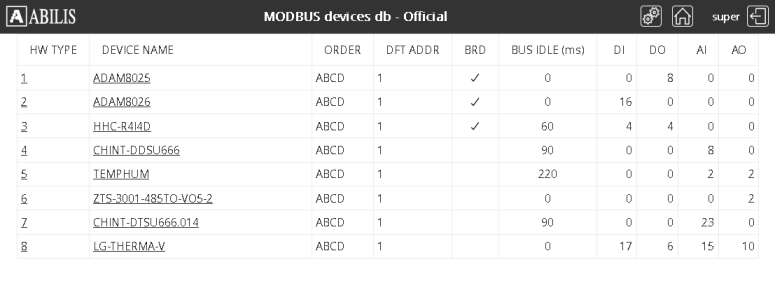
It will be made available in a very short time also from the new web interface.
-
- KNX devices
-
-
KNX is a standard for commercial and residential building automation. It can use twisted pair (in a tree, line or star topology), power-line, RF, or IP links.
An "ETS project" usually refers to the design of home automation systems (domotics) or buildings using the ETS (Engineering Tool Software) of the KNX standard,
The functions of the Abilis KNX driver are:
-
support for up to 7 KNX resources, meaning that up to 7 KNX buses can be connected to Abilis
-
loading an ETS project into an Abilis KNX resource, from which devices are imported with their communication objects and group addresses
-
reading/setting the status of communication objects (device I/Os)
-
integration with the Abilis IO manager, so it is possible to create automations with Lua scripts, create maps and monitor device I/Os.
An Abilis resource interfaces with the KNX bus via the Weinzierl KNX BAOS Module 830 device, with which it communicates via UART.
-
-
KNX resources are mainly managed in Abilis using command line interface.
Commands available for KNX resources management are listed below:
A RES:Knx-n                             Add new KNX resource
C RES:Knx-n                             Delete an existing KNX resource
D P[E] RES:Knx-n                        Display parameters of an existing KNX resource
S P[E] RES:Knx-n                        Set parameters of an existing KNX resource
INIT RES:Knx-n                          Refresh settings of an existing KNX resource
D D[E] RES:Knx-n                        Display diagnostics of an existing KNX resource
S S RES:Knx-n SLAVE:m DO:val ON|OFF     Set status of DO Line [ON, OFF]
S S RES:Knx-n SLAVE:m AO:val <num>      Set value of AO Line
On resource addition, the resource identifier is limited by the maximum number of KNX devices configured in IO resource and the new resource activation depends on license setting:
[11:26:49] ABILIS-CPX:d p res:io

RES:Io ------------------------------------------------------------------------
Run    DESCR:Io_devices_entry_point
       LOG:DS        ACT:YES     TOS:0-N                      tcp-rwin:16384
       max-rio:4     max-wio:1   max-mio:4   max-knx:1        tcp-swin:16384
       wdir:C:\APP\IO\

[11:26:54] ABILIS-CPX:d p res:io ? max-knx

Io resource parameters:

max-knx:   Maximum number of Knx devices [1..7]

[11:27:04] ABILIS-CPX:LICENCE DISPLAY PERMISSIONS

ACTIVE PERMISSIONS:

-------------|-----------|-----------------------------------------------------
Name         |Value      |Description
-------------|-----------|-----------------------------------------------------
ABILISID     |1801237    |Abilis CPX serial number
EXPIRY       |NONE       |Licence expiration date YYYYMMDD
MAXVER       |9          |Licence is valid up this Abilis major version
-------------|-----------|-----------------------------------------------------
...
KNX          |1          |Number of KNX resources [0, 1..7]
Configured KNX resources are visible in D DEV command layout:
[10:08:20] ABILIS-CPX:d dev
...
------------- Active Rio/Wio/Mio/Knx/Rvs Resources and Devices: ---------------
Res         Bound  Descr                  St MAC                IpAddr/LowRes
-------------------------------------------------------------------------------
...
Knx-1              Knx-1                  UP                    AsyncU-1
Knx-2              Knx-2                  dn
-
Full KNX resource configuration is done by means of ETS project loading.
Only few parameters can be configured from Abilis, mainly the KNX device lower resource and the descriptions of the various objects (slave nodes, lines, group addresses).
Available commands are listed below:
KPROJ DISPLAY                      Display the list of KNX project files
KPROJ LOAD <filename> RES:Knx-n    Load a KNX project to the given KNX resource.
Once uploaded to Abilis, ETS projects files can be listed:
[16:30:56] ABILIS-CPX:KPROJ DISPLAY

KNX projects available in 'C:\APP\IO\KNX\':

File                                         Date         Time             Size
-------------------------------------------------------------------------------
test1-3levels.knxproj                        06/10/2025   09:29:38       270320
test1-free.knxproj                           06/10/2025   09:29:38       435821
test2-3levels.knxproj                        06/10/2025   09:29:40       346369
A KNX project can be loaded for an already existing resource or for a new not yet existing resource.
If the resource already exists, it is completely reconfigured. Otherwise if the resource does not exist yet, it is created when the command is executed.
Sample output of KNX project loading is presented below:
[16:51:03] ABILIS-CPX:kproj load test2-3levels.knxproj res:knx-1

YOU ARE GOING TO LOAD THE KNX PROJECT 'C:\APP\IO\KNX\test2-3levels.knxproj' TO Knx-1 resource.
THE Knx-1 resource IS CURRENTLY NOT PRESENT, IT WILL BE CREATED.
THIS OPERATION MAY TAKE SOME TIME.
PROCEED (N/Y)?y

Project Name: test_3
Project ID: P-039B
Schema Version: 20
GA Style: 3
There are 5 hardware products
  IPR/S3.1.1 IP-Router,REG (IPR/S3.1.1 IP-Router)
  SA/S8.16.1 Switch Actuator,8-fold,16A,MDRC (SA/S8.16.1)
...
There are 5 program products
  M-0002_H-2CDG.20110.20175.20R0011-2_HP-A0A9-10-5056 (M-0002_A-A0A9-10-5056)
  M-0002_H-2CDG.20110.20064.20R0011-1_HP-A03B-20-D31A (M-0002_A-A03B-20-D31A)
...
There are 19 group addresses
Group Address: 0/0/1 [Switch1_ST]
  Object 0: Output A
  Object 1: Rocker push-button 1
  Object 29: Status Switch
...
There are 5 spaces
Space: test_3 [Building]
  Space: House [BuildingPart]
    Space: Living Room [Room]
      Device: 1.1.3
      Device: 1.1.2
    Space: Corridor [Corridor]
      Space: Cabinet 1 [DistributionBoard]
        Device: 1.1.1
...

COMMAND EXECUTED
Configured KNX resources and nodes are visible in D TREE command output:
[10:06:27] ABILIS-CPX:d tree

...
----------------------------- System Resource(s) ------------------------------
...
Io
  \---Rio-1
  \---Rio-2
  \---Knx-1
      \---Knx-1.1, Knx-1.2, Knx-1.3, Knx-1.4
      \---AsyncU-1
  \---Tcp
...
Configuration sample:
[17:06:53] ABILIS-CPX:d p res:knx-1

RES:Knx-1 ---------------------------------------------------------------------
Run    DESCR:Knx-1
       LOG:DS          ACT:YES   LOWRES:AsyncU-1
       PROJ-NAME:
       GA-STYLE:3-LEVELS         obj-tab-size:500
       ------------------------------------------------------------------------
       SLAVE:1    ADDRESS:1.1.1
       PRODUCT:KNX BAOS Serial 820/870
       HW:KNX BAOS Serial 820/870
       ------------------------------------------------------------------------
       SLAVE:2    ADDRESS:1.1.2
       PRODUCT:Switch \actuator, 1 channel 16A
       HW:2CSYK1101x Switch actuator 16A
       DIGITAL INPUT
       DI:1    DESCR:Output A - Disabling LED
               OBJECT-NUMBER:9    FLAGS:rWCTuil   DATAPOINT-TYPE:1.003
               GAS:0/0/70
               EVENT-THR:60       ALERT:NO        ALERT-ST:#
       DI:2    DESCR:Output A - Switching
               OBJECT-NUMBER:0    FLAGS:rWCtuil   DATAPOINT-TYPE:1.001
               GAS:0/0/1,0/0/21
               EVENT-THR:60       ALERT:NO        ALERT-ST:#
       DIGITAL OUTPUT
       DO:1    DESCR:Output A - Disabling LED
               OBJECT-NUMBER:9    FLAGS:rWCTuil   DATAPOINT-TYPE:1.003
               GAS:0/0/70
               CONTROL-D:#                        CONTROL-D-ST:#
               ALERT:NO           ALERT-ST:#
       DO:2    DESCR:Output A - Switching status
               OBJECT-NUMBER:4    FLAGS:RwCTuil   DATAPOINT-TYPE:1.003
               GAS:0/0/8
               CONTROL-D:#                        CONTROL-D-ST:#
               ALERT:NO           ALERT-ST:#
       ------------------------------------------------------------------------
       SLAVE:3    ADDRESS:1.1.3
       PRODUCT:Binary input module, 2 chan., 2 rocker buttons
       HW:2CSYK1003x 2 binary input module 2 rocker switch
       DIGITAL INPUT
       DI:1    DESCR:Rocker push-button 1 - Upper rocker button -Switching
               OBJECT-NUMBER:1    FLAGS:rWCTuiS   DATAPOINT-TYPE:1.001
               GAS:0/0/1
               EVENT-THR:60       ALERT:NO        ALERT-ST:#
       DI:2    DESCR:Rocker push-button 1 - Lower rocker button -Switching
               OBJECT-NUMBER:2    FLAGS:rWCTuil   DATAPOINT-TYPE:1.001
               GAS:0/0/2,0/0/20
               EVENT-THR:60       ALERT:NO        ALERT-ST:#
       DI:3    DESCR:Rocker push-button 1 - Disabling
               OBJECT-NUMBER:0    FLAGS:rWCtuiU   DATAPOINT-TYPE:1.003
               GAS:0/0/64
               EVENT-THR:60       ALERT:NO        ALERT-ST:#
       ...
       ANALOG OUTPUT
       AO:1    DESCR:Input A - Relative dimming
               OBJECT-NUMBER:23   FLAGS:rWCTUil   DATAPOINT-TYPE:3.007
               GAS:0/0/10
               ALM-LO:-           ALM-HI:-           HYST:0
               ALERT-ALM-LO:NO    ALERT-ALM-HI:NO
       AO:2    DESCR:Input B - Actuator unit switch telegr D
               OBJECT-NUMBER:18   FLAGS:rWCTUil   DATAPOINT-TYPE:4.*
               GAS:0/0/23
               ALM-LO:-           ALM-HI:-           HYST:0
               ALERT-ALM-LO:NO    ALERT-ALM-HI:NO
       AO:3    DESCR:Rocker push-button 2 - 8 bit scene
               OBJECT-NUMBER:8    FLAGS:rWCTUiS   DATAPOINT-TYPE:5.010
               GAS:0/0/3
               ALM-LO:-           ALM-HI:50         HYST:0
               ALERT-ALM-LO:NO    ALERT-ALM-HI:NO
       AO:4    DESCR:Input B - Actuator unit switch telegr E
               OBJECT-NUMBER:19   FLAGS:rWCTUil   DATAPOINT-TYPE:4.*
               GAS:0/0/24
               ALM-LO:-           ALM-HI:-           HYST:0
               ALERT-ALM-LO:NO    ALERT-ALM-HI:NO
RES:AsyncU-1 ------------------------------------------------------------------
Run    DESCR:AsyncU-1
       LOG:DS
Diagnostic sample:
[15:41:08] ABILIS-CPX:D D KNX-1

RES:Knx-1 ---------------------------------------------------------------------
       Knx-1
       STATE:UP                  LOWRES:AsyncU-1
       Lines summary:  DI:13  DO:8  AI:4  AO:4
   ----------------------------------------------------------------------------
   SLAVE:1    STATE:N/A  DI:0   DO:0   AI:0   AO:0
   ----------------------------------------------------------------------------
   SLAVE:2    STATE:UP   DI:2   DO:2   AI:0   AO:0
   DIGITAL INPUT
   DI:1  .    Output A - Disabling LED
   DI:2  .    Output A - Switching
   DIGITAL OUTPUT
   DO:1  .    Output A - Disabling LED
   DO:2  ON   Output A - Switching status
   ----------------------------------------------------------------------------
   SLAVE:3    STATE:UP   DI:11  DO:6   AI:4   AO:4
   DIGITAL INPUT
   DI:1  .    Rocker push-button 1 - Upper rocker button -Switching
   DI:2  .    Rocker push-button 1 - Lower rocker button -Switching
   ...
   ANALOG OUTPUT
   AO:1  . .  Input A - Relative dimming
   AO:2  . .  Input B - Actuator unit switch telegr D
   AO:3  4    Rocker push-button 2 - 8 bit scene
   AO:4  . .  Input B - Actuator unit switch telegr E
Refer to Abilis Totorial for further information.
Full support of KNX administration will be made available in a very short time also from the new web interface.
-
- IPACL
-
-
The performance of the IPACL service has been significantly improved by introducing the use of a cache, where the results of checks performed on forwarded traffic are kept for a certain period of time.
The main benefits of this feature are a significant overall increase in throughput and a reduction in CPU consumption.
The cache size can be adjusted based on the environment needs, using the appropriate parameter:
[08:51:38] ABILIS-CPX:d ipacl

IPRTR parameters:  ACL:YES       ACLBYPASS:#                 ACL-FIREWALL:YES
                   COS:ENABLED   COSDFT:NORMAL               acl-cache:1000
[09:04:02] ABILIS-CPX:d p res:iprtr ? acl-cache Iprtr resource parameters: acl-cache: Size of the cache used to store packets permitted by Access list [1000..50000].The parameter is not refreshable and when changed the system reboot is requested.
An additional a dedicated section in the IPRTR diagnostics shows the IPACL cache relevant informations:
 [08:51:38] ABILIS-CPX:d d iprtr

RES:Iprtr ---------------------------------------------------------------------
       IP_Router_general_properties
       STATE:READY
       ...
       IPACL Diagnostics
       -----------|---State---|-Current%--|--Current--|---Peak----|----Max----|
       CACHE      |NORMAL     |         22|        226|       1000|       1000|
       ------------------------------------------------------------------------
-
- IPLOG
-
-
The IP monitor service now includes the possibility to trace IP addresses activity.
The service is named "IPLOG" and it can manage up to 32 IP addresses, which activity should be logged, i.e. for any configured IP address incoming/outgoing IP packets are traced.
Available commands for the IP logging feature are:
A/C/D/S IPLOG IP:x.x.x.x          To add/clear/display/set an IP address
INIT IPLOG                        To refresh configuration settings
D D IPLOG IP:x.x.x.x              To inspect the log of an IP address
Full support of IPLOG administration will be made available in a very short time also from the new web interface.
Configuration sample:
[08:56:58] ABILIS-CPX:d iplog

IP:             ACT: SYSLOG: DESCR:
-------------------------------------------------------------------------------
192.168.000.004 NO    NO      timoty_station
192.168.106.002 YES   NO      my_station
192.168.106.220 YES   YES     main_server
Parameters:
[09:45:37] ABILIS-CPX:d iplog ?

...

IP address whose activity is logged parameters:

IP:        IP address [1-126.x.x.x, 127.0.0.1, 128-223.x.x.x]
ACT:       Activate/deactivate activity logging [NO, YES]
SYSLOG:    Send events to SYSLOG [NO, YES]
DESCR:     Host description.
           Max 32 chars. Spaces require double quotes (E.g. "str1 str2").
Sample of the log:
[09:10:28] ABILIS-CPX:d d iplog ip:192.168.106.220

Date   Time   Dir SrcIp:SrcPo           DstIP:DstPo           Protocol
------ ------ --- --------------------- --------------------- ------------------
190119 100849 In  172.016.015.104:57205 192.168.106.220:161   UDP
190119 100849 Out 192.168.106.220:161   172.016.015.104:57205 UDP
190119 100902 Out 192.168.106.220:25541 192.168.106.119:4685  TCP
190119 100918 In  172.016.015.104:44309 192.168.106.220:161   UDP
190119 100918 Out 192.168.106.220:161   172.016.015.104:44309 UDP
190119 100918 In  172.016.015.104:51520 192.168.106.220:161   UDP
190119 100918 Out 192.168.106.220:161   172.016.015.104:51520 UDP
190119 100919 In  172.016.015.104       192.168.106.220       ICMP (Echo-Request)
190119 100919 Out 192.168.106.220       172.016.015.104       ICMP (Echo-Reply)
190119 100920 Out 192.168.106.220:26054 192.168.106.119:4685  TCP
190119 100937 Out 192.168.106.220:26567 192.168.106.119:4685  TCP
190119 100949 In  172.016.015.104:33376 192.168.106.220:161   UDP
190119 100949 Out 192.168.106.220:161   172.016.015.104:33376 UDP
...
The IP addresses activity log is saved on disk (max 500 events per IP address):
[09:17:02] ABILIS-CPX:d p IPMON ? max-events

IpMon resource parameters:

max-events: Maximum number of events per IP address [50..500]
The full log of the single IP address can also be sent to a remote SYSLOG server.
For this purpose the range of the 'LOCAL-SOURCES' parameter of the SYSLOG driver has been extended by adding 'IPLOG' value:
[12:00:31] ABILIS-CPX:d p res:syslog ? local-sources

SysLog resource parameters:

LOCAL-SOURCES: Allowed message sources [#, L, LDM, NPV, CP, IPRES, ETHDEV, IPSEC,
           SIPREG, SIPCALL, HTTP, AIPT2, SMS, IPLOG, ALL], where:
           - #      : no message source is allowed
           ...
           - IPLOG  : IP address activity log
           Values can be joined using ',' (comma).
-
- AIPT2
-
-
Extended preferential traffic flow selection by adding 'MOBILE' option, for 3G/4G/5G mobile connections: it works similarly to VoIP, but without duplicate packets.
More specifically, it uses a score based on MISS (40%), JITTER (33%) and RTT (27%) to distribute traffic across paths. THR% is not considered. The minimum interval between one burst and the next is 6 hours.
[16:09:20] ABILIS-CPX:d p res:ip aipt2 ? CONTROL

Ip (Abilis IP tunnel v.2) resource parameters:

CONTROL:   Controller activation and traffic selection [NONE, VoIP, VPN,
           STREAMING, SURFING, MOBILE], where:
           - NONE (default): No preferential traffic filters are used.
           - VoIP (Voice over IP): Original traffic is distributed on the most
             suitable path, while redundant traffic is sent on the second most
             suitable path. Path suitability is determined by total scores
             based on packet loss, JITTER, and RTT.
           - VPN (Interactive traffic, Interactive Video, Videogames): Traffic
             is distributed across paths according to the best combined score
             based on RTT, throughput, JITTER, and packet loss.
           - STREAMING (Video streaming): Traffic is sent over the path with
             the highest available throughput and packet loss as a secondary
             factor.
           - SURFING (Browsing): Traffic is sent over the path with the lowest
             packet loss, with throughput as a secondary factor.
           - MOBILE (for 3G/4G/5G mobile connections): Mobile works similarly
             to VoIP, but without duplicate packets.
           See also HELP AIPT2 CONTROL.
-
- SMS
-
-
Added the possibility to send a copy of outgoing SMS messages by e-mail to one or more SMTP recipients.
For this purpose new 'COPY-MAIL-TO' parameter is present in SMS router configuration and also in routings for outgoing messages.
Therefore the e-mail holding the copy of the SMS message can be sent/not-sent for any message or per routing.
[17:54:46] ABILIS-CPX:d p res:sms

RES:CtiSms --------------------------------------------------------------------
Run    DESCR:Short_Message_Service
       LOG:NO          ACT:YES      MAX-SMS-SPLIT:4     ALLOW-UNICODE:NO
       DFT-IN:SMTP
       DFT-MAIL-TO:admin@mymail.it
       COPY-MAIL-TO:spvisor@mymail.it
       wdir:C:\APP\SMS\
       SMTP-SERVER:#
       smslogsize:100 KiB (~126 events)
       REP-SMS-FILTER:YES           REP-SMS-FILTER-SIZE:FULL
[17:58:23] ABILIS-CPX:d p res:sms ? copy-mail-to CtiSms resource parameters: COPY-MAIL-TO: SMTP recipients for a copy of outgoing SMS. Max 128 ASCII characters. Space not allowed.[17:58:27] ABILIS-CPX:d sms out ? copy-mail-to ... SMS routings for outgoing messages parameters: COPY-MAIL-TO: SMTP recipients for a copy of outgoing SMS. - SYS, use value configured in COPY-MAIL-TO of CtiSms resource. - #, e-mail is not sent. - Valid e-mail address, max 128 chars. Space not allowed.
-
- Firewall
-
-
The DROP driver, responsible for downloading and updating the contents of the list of malicious hosts (DROP list) of the Firewall, can now collect data from more sources, up to five.
[10:06:52] ABILIS-CPX:d p res:drop

RES:Drop ----------------------------------------------------------------------
Run    DESCR:DROP_list_maintenance_service
       LOG:NO               ACT:YES   droplog:DFT              droplogsize:20
       UPD-INT:1440                   dwnlbufsize:50
       wdir:C:\APP\DROP\
       ------------------------------------------------------------------------
       x USEx: TYPEx:   URLx:
       -+-----+--------+-------------------------------------------------------
       1 YES   SPAMHAUS https://www.spamhaus.org/drop/drop.txt
       2 NO    IP       https://ap.antek.it/locdroplist/banips.txt
       3 YES   SUBNET   https://gui.antek.it/malv/net.txt
       4 NO    #
       5 NO    #
By default the first used source is still the list of dangerous IP addresses, made available by the accredited Spamhaus international organization.
Since the lists provided by different organizations may have different formats, the user is also asked to specify the format of the file to download from the given URL.
The currently supported formats are:
-
SPAMHAUS: Spamhaus DROP.TXT file
-
IP: plain textual list of IP addresses in DDN (x.x.x.x)
-
IR: plain textual list of IP ranges in DDN (x.x.x.x:y.y.y.y)
-
SUBNET: plain textual list of subnets in slash notation (x.x.x.x/nn)
Diagnostic sample:
[08:56:58] ABILIS-CPX:d d drop RES:Drop ---------------------------------------------------------------------- DROP_list_maintenance_service STATE:ACTIVE PHASE:WAITING (for 86400 s) CUR-UPD-INT:1440 MAX-SUBNETS:6400 CUR-DWNLBUFSIZE:50 ------------------------------------------------------------------------ Last update: Wed, 21/01/2026 10:30:36 Result: OK Subnets: 1511 Overflow:No Next update: Thu, 22/01/2026 10:30:36 ------------------------------------------------------------------------------ x |Result |URLx |Used/Found --+---------+------------------------------------------------------+---------- 1 OK https://www.spamhaus.org/drop/drop.txt 1450/1450 2 NOT-USED https://ap.antek.it/locdroplist/banips.txt 3 OK https://gui.antek.it/malv/net.txt 61/61 4 NOT-USED 5 NOT-USED ------------------------------------------------------------------------------ -
-
- ICMP
-
-
Added redirect cache to avoid sending multiple redirect messages from the same socket within 1 second.
The old implementation could send one redirect for each packet received.
With the cache, it now sends a maximum of 1 redirect per second. For significant throughput savings.
-
- GPS
-
-
Added support to U-blox M7 device.
-
Added support to Globalsat BU-353N5 device.
-
- VO/Abilisphone
-
-
Added new 'AP-DEVINFO-LFT' parameter, which can be used to extend/reduce the life of devices information collected and kept by Abilis upon device registration. By default it is 10 days.
[12:01:19] ABILIS-CPX:d p res:vo

RES:CtiVo ---------------------------------------------------------------------
Run    DESCR:CTI_Virtual_Office
       ...
       - AP Data Channel Settings ---------------------------------------------
       ap-channels:10                ap-udp-locport:48484    AP-TOS:0-D
       AP-IPSRC:*                    AP-IPSRCLIST:#
       AP-AUTH-TOUT:20               AP-CONN-TOUT:20         AP-PS-TOUT:20
       AP-DTMF-LEN:200               AP-DTMF-SILENCE:100
       AP-NOTIFY-HOST:apnotify.abilis.net
       AP-DEVINFO-LFT:10
       ...

[12:01:51] ABILIS-CPX:d p res:vo ? AP-DEVINFO-LFT

CtiVo resource parameters:

AP-DEVINFO-LFT: Liftime of Abilisphone device info [1..365 day]
-
- SMTP/POP3
-
-
Added 'STARTTLS' parameter, which can be used to run-time enable/disable TLS for incoming mails.
[12:01:19] ABILIS-CPX:d p res:smtp ? STARTTLS

Smtp resource parameters:

STARTTLS:  Enable/disable TLS for incoming mails [NO, YES]
           NO  = Plain text connection, insecure, no protection.
           YES = The connection starts in plain text then may switch
                 to an encrypted connection on client side demand.
-
- ALERT
-
-
Alert manager page now shows where any defined entry is used:
Figure: Alert manager web page
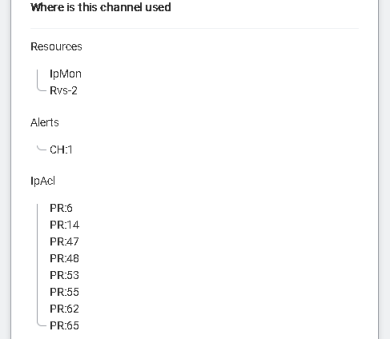
The same feature is available from the command line interface:
[09:32:43] ABILIS_CPXd alert ch:10 ref

---+----+----------------------------------------+------------+----------------
CH:|ACT:|DESCR:                                  |FILTER:     |FILTER-INTERVAL:
   |LOG:|ACTION:                                 |FURTHER-ALERT:
---+----+----------------------------------------+-----------------------------
10 |YES |IPACL                                   |INTERVAL    |600
   |NO  |MAIL                                    |NO
-------------------------------------------------------------------------------

REFERRED IN:
- RES:IpMon
- RES:Rvs-2
- Alerts, CH:1
- IP Access Lists, PR:6,14,47,48,53,55,62,65
-
- MULTICORE
-
-
Committed some sub-tasks to extra cores, greatly improving efficiency of processes.
Some of the most relevant:
-
AIPT2 transit collector calculation.
-
TRFA periodic IP data saving.
-
RSA primary key generation or public and private decryption and encryption.
-
-
- SNMP
-
-
Updated ABILIS-CPX-2-MIB by adding new groups for new services:
-
added 'cxMio' group for Mio resources diagnostics/statistic.
-
added 'cxKnx' group for KNX resources diagnostics/statistic.
-
added 'cxAsyu' group for Async USB resources diagnostics/statistic.
-
added 'cxE5G' group for Eth5G resources diagnostics/statistic.
-
added 'cxEWifi' group for EthWifi resources diagnostics/statistic.
-
added 'cxCtiPoDgWPotsTable' and 'cxCtiPoStWPotsTable' for WPOTS diagnostics/statistic.
-
added IPACL cache diagnostics to 'cxIpRtrDgTable'.
-
-
- LICENCE
-
-
Version 9.1.0, as well as versions 9.0.x, requires licence, with 'MAXVER' minimum value set to '9'.
-
Starting from this version OSPF and CHAT services will be free. Therefore 'OSPF' and 'CHAT' permissions becomes obsolete.
-
Added 'MIO' permission, for the number of MODBUS resources that can be activated [0, 1..15].
-
Added 'KNX' permission, for the number of KNX resources that can be activated [0, 1..7].
-
- TRACE
-
-
The time stamp precision of the internal NCB trace is now in microseconds, while in previous versions it was in milliseconds.
The file format changed, the version is now v.12.1, anyway Trace management tools, which use and convert NCB's internal trace files, still support all previous versions.
-
No longer supported features
- Users
-
-
Restricted range of 'ADDRBOOK-PUB-EDITABLE' parameter from [SYS, NO, YES] to [NO, YES] and removed 'ADDRBOOK-PUB-EDITABLE' parameter from CTISYS.
[17:27:50] ABILIS-CPX:d user:a ? addrbook-pub-editable

User's parameters:

ADDRBOOK-PUB-EDITABLE: Enable the user to add/delete/update 'public' contacts
           of Abilis Address Book [NO, YES]
           User 'super' is always enabled. User 'admin' is always enabled.
           User 'guest' is always disabled.
The 'SYS' value is no longer supported, therefore starting from this release, user capabilities on public contacts in the Abilis address book must be established by the user administrators on a user-by-user basis.
Public contact editing is disabled by default for users who aren't at least administrators.
Moreover users having 'ADDRBOOK-PUB-EDITABLE' parameter set to 'SYS' in the previous releases, will have it converted to 'YES' if they are at least administrators, otherwise 'SYS' value is converted to 'NO'.
-
- General
-
-
General 'SYSNAME' parameter no longer has the same meaning it had in the past, instead it now coincides with the Control Port prompt.
Therefore, setting the Control Port prompt value will effect also the 'SYSNAME' present in the general system configuration and vcv.
[19:24:13] ABILIS_99:_d p res:cp | pi

       LOG:NO                PI:ABILIS_99:_        sesnum:8      ps:512

[19:24:24] ABILIS_99:_d g | sysname

SYSNAME:    ABILIS_99:_

[19:24:28] ABILIS_99:_d g ? sysname

General system parameters:

SYSNAME:   System name and Control port prompt.
           From 1 to 16 ASCII characters. Space not allowed.
           Automatically converted to upper case.
           Always refreshed run-time (it doesn't need INIT command)
-
Bug fixes
- IKE
-
-
Fixed bug on IKEv2 when host is initiator: floating UDP port wasn't correctly replaced from 500 to 4500 when NATT:YES.
-
Added create-child implementation when Abilis is initiator.
-
Fixed bug that caused IKEv2 SA to close after a renewal due to DPD failure: transmission of request wasn't restarted correctly.
-
Fixed bug that caused IKEv2 SA to be reused also for renewal. DPD issue was caused also by this bug.
-
Fixed bug that could cause the UP state to be logged twice.
-
- NAT
-
-
Fixed bug for PAT:NO translations: APO: was wrongly used even if that parameter is hidden when PAT is not used.
-
- HTTP
-
-
Fixed redirection loop that occurs when setting "/sys/pub/cpx.htm" as preferred home for the user, i.e. 'HTTP-HOME-URL' parameter.
-
- POP3
-
-
Fixed while loops on mail files list that could overflow if the list is full.
-
- LDAP
-
-
Added check on pointer that could be NULL Client causing exception and system restart.
-
- All drivers
-
-
All bug fixes up to 9.0.8 are included in 9.1.0.
-
Known bugs
-
-
None
-